Add stakeholders
Written By BildrX
Last updated 6 days ago
A stakeholder is anyone who can hold equity: a founder, investor, employee, advisor, or an entity like a fund or holding company.
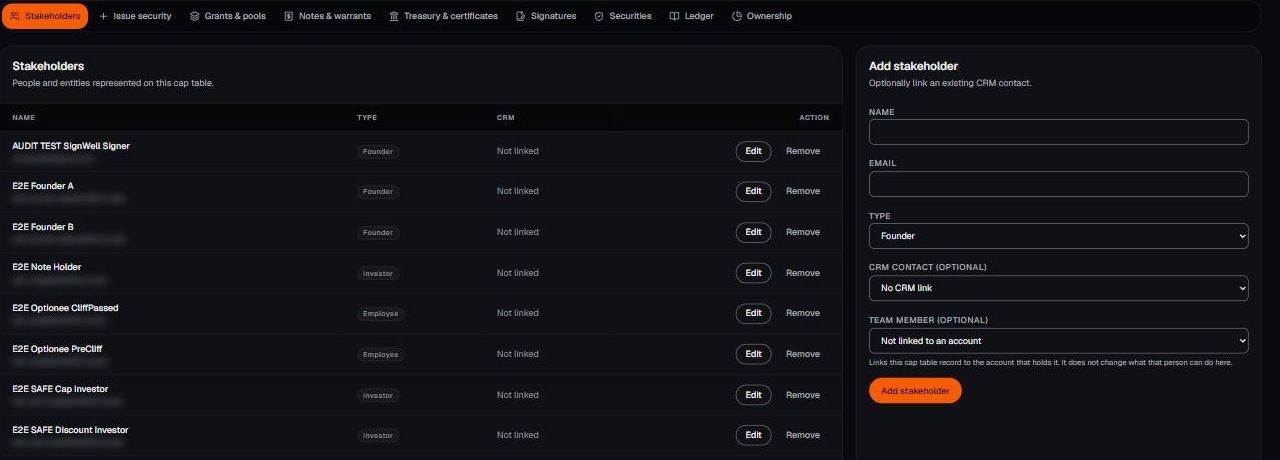
- Go to Cap Table → Stakeholders.
- Click Add stakeholder.
- Enter name and email, then choose a type: Founder, Investor, Employee, Advisor, or Entity.
- Optionally link them to an existing CRM contact, so investment history and conversation history sit together.
- Save.
Type is for your own reporting and doesn't change the maths. Use Entity for funds, SPVs, and holding companies rather than a partner's personal name.
BildrX gives operational tools for managing your cap table. It doesn't give legal, tax, or financial advice. Equity decisions carry legal and tax consequences that depend on your jurisdiction and circumstances. Get advice from a qualified lawyer or accountant before issuing securities, granting options, or closing a round.