Set up your option pool and grant options
Written By BildrX
Last updated 6 days ago
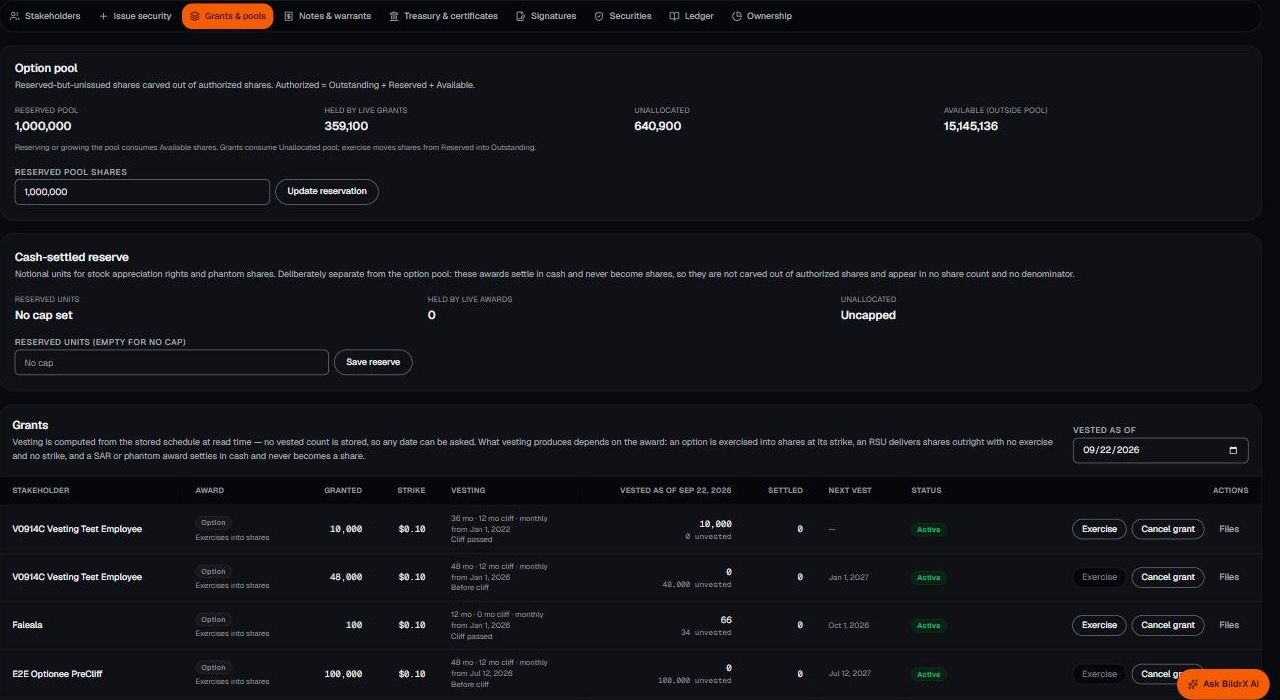
Reserve the pool. Cap Table → Grants & pools tracks four numbers: reserved pool, held by live grants, unallocated, and available outside the pool.
Grant options
- Click Record grant.
- Choose stakeholder, quantity, and strike price.
- Set vesting: duration, cliff, frequency, and start date.
A standard schedule is 48 months with a 12-month cliff, vesting monthly. Advisor grants are usually shorter.
How vesting is calculated. BildrX computes vested amounts from the schedule every time you look, so the number is never stale. Use Vested as of to check any date, including future ones. A 100-option grant vesting monthly over 12 months with no cliff shows 66 vested after 8 months. Partial months don't count, so it rounds down.
Exercise turns vested options into shares, which appear under Securities. Cancel grant ends it, typically when someone leaves, and the grant stays visible in your records marked cancelled.
BildrX supports stock options. Track any other award type outside BildrX.
BildrX gives operational tools for managing your cap table. It doesn't give legal, tax, or financial advice. Equity decisions carry legal and tax consequences that depend on your jurisdiction and circumstances. Get advice from a qualified lawyer or accountant before issuing securities, granting options, or closing a round.