Model a priced round
Written By BildrX
Last updated 6 days ago
The priced round modeler shows exactly what a round does to your cap table before you commit.
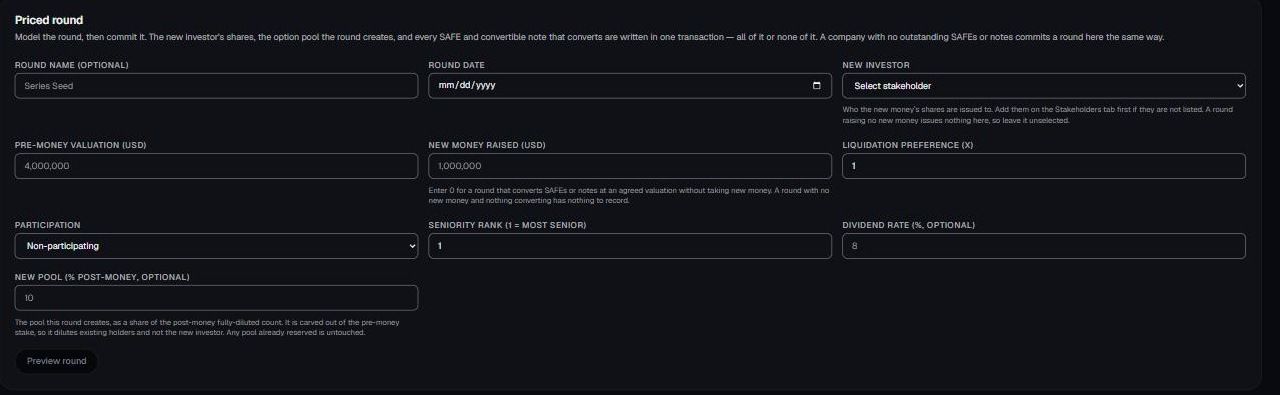
- Go to Cap Table → Securities and find the Priced round section.
- Enter pre-money valuation, new money, and the new option pool as a percentage of post-money.
- Click Preview round and review the result.
The preview shows round price per share, shares issued to the new investor, the new pool carve-out, post-round ownership for everyone, and a side-by-side view of what the pool costs existing holders.
That last number is the one founders miss. A pool created before the round dilutes you, not the new investor.
Commit only after the round has actually closed. BildrX writes everything in one transaction: the investor's preferred shares and the pool reservation. Either all of it lands or none of it does.
Liquidation preference isn't modeled. You get ownership percentages and share counts, not exit proceeds. For waterfall analysis, speak to your lawyer or financial advisor.
BildrX gives operational tools for managing your cap table. It doesn't give legal, tax, or financial advice. Equity decisions carry legal and tax consequences that depend on your jurisdiction and circumstances. Get advice from a qualified lawyer or accountant before issuing securities, granting options, or closing a round.